
Create your account
- Open Breaking Wind and sign in with Apple or Google. There are no passwords. Nothing opens until you've signed in.
- Read the safety note and turn on the switch to say you understand it isn't a navigation tool. Then tap Continue.
- Under What should we call you?, enter your name and a handle. Handles are 3 to 20 letters, numbers or underscores, and you can't change yours later, so choose carefully.
- Under Tell us about your boat, add your boat's name, type and home waters.
- Tap Allow location. You can skip this and turn it on later, but the map won't know where you are.
- Follow a few boaters if you like, then tap Start exploring.
What your device needs
On the water, the app needs a GPS position. iPhones and cellular iPads have GPS built in. Wi-Fi iPads don't, so they need a connected GPS receiver. Most features also need a data connection.
Tell it about your boat
Tap the panel button at the top left, then You, then the gear. Under Your boat, set your chain, bow roller height, draft, length and cruising speed. Anchor math and route times use these.
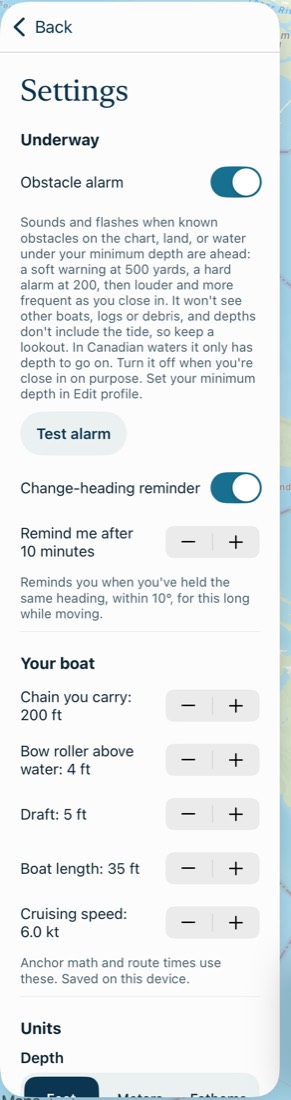
Then go back to You, tap Edit profile and set your Minimum depth. It starts at 10 ft. Route planning and the obstacle alarm both use it, and only you can see it.
Find your way around
The panel has four tabs. A phone starts with the panel closed, so tap the button at the top left to open it.
- Map: conditions here, marks nearby, and buttons for routes, anchor math and recording a trip.
- Marks: the latest posts from everyone, or from people you follow.
- Fleet: your boats, your messages and your invites.
- You: your profile, trips, routes, posts and settings.
At the top of the panel, the magnifying glass finds people and boats, and the bell shows your notifications.
The buttons at the top right of the map, left to right:
- Arrow: follow your position. Moving the map turns it off.
- Layers: add wind, current, depth and more.
- Waves: show or hide the tide chart.
- Heads-up: big numbers for the helm.
Common problems
Sign in doesn't work.
Check your connection and try again. If you used Apple last time, use Apple again, because Apple and Google sign-ins can make separate accounts.
My handle is taken.
Handles are unique. Try another one, such as your boat's name.
It doesn't show my position.
Check that location is allowed for Breaking Wind in your device's Settings, then tap the arrow on the map. A Wi-Fi iPad needs a connected GPS. Indoors, any device can take a while to get a position.
Next: A day on the water