
Settings, notifications and your account
Units, notifications, your data and your account.
Open Settings
Tap You, then the gear.
Your boat
Set Chain you carry, Bow roller above water, Draft, Boat length and Cruising speed. These are saved on this device, so set them on each device you use.
Units
- Depth: Feet, Meters or Fathoms.
- Speed: Knots or MPH, for boats and currents.
- Temperature: °F or °C.
Wind stays in knots. Tide heights, bathymetry numbers and the conditions saved on posts stay as recorded.
Notifications
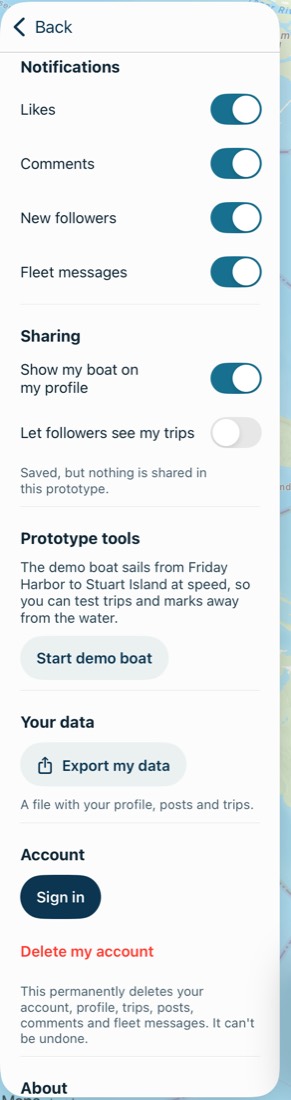
Turn each kind on or off: Likes, Comments, New followers and Fleet messages. The app first asks for permission after your first mark, or when you create or join a fleet.
Fleet notifications show the message's words, up to 140 characters. To keep them off your lock screen, hide previews in your device's Settings. Notifications never show a location. Tap the bell in the panel to see them all in the app.
Underway alerts
See Underway alerts.
Blocked people
Blocked appears if you've blocked someone. Tap Unblock beside their handle.
Export your data
Under Your data, tap Export my data. You get a file, breaking-wind-data.json, with your profile, posts and trips. It doesn't include routes, fleet messages or comments you left on other people's posts.
Sign out
Under Account, tap Sign out. If anything hasn't been sent yet, the app warns you first, because signing out loses it. Get back in coverage to keep it.
Delete your account
Tap Delete my account and confirm. It permanently deletes your account, profile, trips, routes, posts, comments and fleet messages, right away, and it can't be undone. If you subscribe through Apple, cancel that separately. See deleting your account.
Working offline
Most of the app needs a connection. Posts, comments, likes, follows, trips and fleet messages wait and send when you're back in coverage. Creating or joining a fleet, inviting someone and sending a route need a connection at the time.
Common problems
Notifications aren't arriving.
Check the switch in Settings, then check that notifications are allowed for Breaking Wind in your device's Settings.
My boat details are different on my other device.
They're saved per device. Set them on each one.
How do I contact you?
Write to support@breakingwind.app. For anything urgent on the water, use VHF channel 16 or your local emergency number.
That's all of them. Support has more, and a person reads the email.